Blackberry running slow problems it was already an issue many people. While I am not a
has been slow as I know.
repaired. Whereas if you know how, you can solve problems without the help of the
shop technician. Just a simple way. I'll explain with a few points.
Content Compression feature works to shrink all the files that could be scaled down in size to save memory capacity of your
.
options -> security options -> general settings -> select "enable" in the Content Compression
Kick 2
REMOVE APPLICATIONS THAT DO NOT USED
Try to check what applications you have no use anymore. Sometimes we install the same application because the curious title that sounded cool but it was not in line with expectations and our needs. Now applications like that sometimes we forgot to get rid of our beloved
BlackBerry!
How:
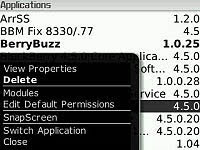
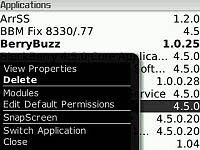
options -> advanced options -> applications -> navigate to the application you want to track deleted -> press menu -> select delete
Note: In the menu of this application you can also delete:
- Games that you've never played.
- Application support letters (font support), Japanese, Chinese and Korean if you do not need application of those languages.
- Help applications. If you already using
Blackberry for a long time and had understood how to do using
Blackberry, you can just delete this application Help.
Kick 3
CLEAN THE BROWSER
Browsers can be slow if not cleaned regularly. But never at any time you clean it with soapy water. Please do not respond to the era of bad technology. Just cleaned up: the browser cache.
So, "What is browser cache?"
Every site you go through the browser, this browser will automatically remember you ever been to this site, the site, log in there, log in here, and so forth. She remembers it all so he can faster loading if tomorrow-morrow you go to the same site. It is called cache memory.
Well, step by step so he's too much to remember, like the browser is so confused themselves. This happens because you never clean the memory / memories of the browsers that are not clear origin.
Let's help the browser so much faster and responsive.
How:
entry into the browser -> press menu -> options -> cache operations -> beat all!
Beat all that mean I select "clear" for all: history, content cache, pushed content and cookie cache.
Clean the browser cache you can do this at least once a week. Or it could be several times a day, if you do less work!
Kick 4
REMOVE ALL SONGS, PHOTOS AND VIDEO ARE NOT NECESSARY
It's obvious. To what ex-girlfriend you keep your photos on the
Blackberry? In addition to the memory of course will take the
Blackberry, will also be fishing the beautiful memory has finished.
If for example there is a song, photo or video that does not matter but took out the "discarded affection", then you should move it to a computer or laptop. Easy right?
Kick-5
REMOVE THE UNUSED THEMES
It's also one that is often forgotten by many people. They love to try a few themes, but after that the themes that are not using that allowed just perched on the
Blackberry. Do not let this happen, my friend. Destroy! Destroy!
How:
options -> theme -> point the tracks to the themes that are not using that -> press menu -> delete
or can also:
options -> applications -> search for themes that are not using that name -> press menu -> delete
So gone are the theme useless ... for forever ...
 Android is the operating system for mobile phones based on Linux. Android provides an open platform for developers to create applications for their own use by a variety of mobile devices. Initially, Google Inc.. bought Android Inc.., newcomers who make software for mobile phones. Then to develop Android, formed the Open Handset Alliance, a consortium of 34 hardware companies, software, and telecommunications, including Google, HTC, Intel, Motorola, Qualcomm, T-Mobile, and Nvidia.


